

Proxy Server
A proxy server acts as an intermediary server between a client and a web server. We explain how proxy servers work, the different types, why companies use them, and how they differ from a VPN.

In a nutshell
- A proxy server is an intermediary server that serves as a gateway between a user’s device and the destination server on the Internet. In doing so, it processes user requests, forwards them to the destination server, and then sends the response back to the user.
- Proxy servers are primarily used to enhance privacy because they can disguise a user’s IP address, making it difficult to track their online activities. They can also increase security by filtering malicious content and caching frequently used web resources to reduce bandwidth usage and improve load times.
- A reverse proxy is a server that sits between client devices and web servers, forwards client requests to the appropriate server, and returns the server’s response; it is often used for load balancing, security, and performance optimization.
What is a proxy server?
A proxy server is an intermediary between a client and a web server located on the Internet. When using a proxy server, internet traffic flows in both directions through the proxy server.
Depending on the application and need, proxy servers can enforce IT security policies for the traffic. They can act as firewalls and web filters but also cache data to speed up frequent requests. Because proxy servers act as the direct communication partner for the web server on the Internet, they can also strengthen data protection and block both access and download of malware.
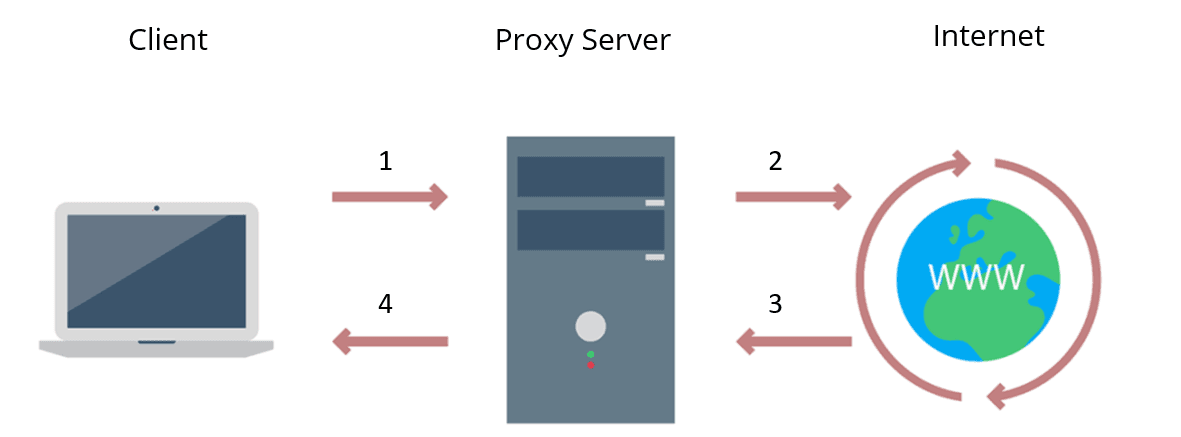
The client sends the web request to the IP address of the proxy server. The proxy server forwards the request to the destination address. The web server sends the request back to the proxy server. The proxy server forwards the requested data back to the client without the client ever communicating directly with the web server.
How does a proxy server work?
When making a request to a web server, a client such as Chrome or Firefox does not establish a direct connection with the web server, but only connects to the proxy server.
Client ←→ Proxy server ←→ Web server
The client then tells the proxy server which website to load. The proxy server then sends this request to the target server on the Internet. The response from the web server then also runs back via the proxy server.
Since the proxy server forwards the web requests in both directions, it can make changes to the data sent. A proxy server can change the sender IP address and anonymise other request fields so that the web server does not know exactly where the client is located. Also, a proxy server can block access to certain websites based on the domain name or IP address.
Where do I get a proxy server?
Proxy servers can be purchased as a service, self-hosted, and even free to use.
Cloud-based proxy servers: Typically, an application from the provider is installed on the end device. This application ensures correct communication with the cloud proxy server. Own hosting: There are a number of providers who sell ready-configured hardware-based and virtual appliances that can be used directly in one’s own data centre. These are often marketed as web proxies. A well-known and powerful open source software solution is Squid Cache. Open proxy servers (paid/unpaid): Some providers offer huge lists of proxy servers that can be accessed publicly and without authentication. Often the operators of these proxy servers do not even know that they are on these lists. Without the corresponding authorisation of the operator, the use of such proxy servers is illegal.
How is the proxy server set up?
To put a proxy server into operation, all IT systems and applications must be configured accordingly. In most cases, the setup is done with the help of an automatic configuration script or an application that has to be installed.
reasons for companies to use a proxy server
Proxies provide a valuable layer of security for users and computers on the internal network. They can be set up as web filters or firewalls, and can help protect IT systems from internet threats such as malware.
Improved security: Proxy servers can prevent known websites from being easily accessible to malware or phishing from the corporate network. Enforcement of corporate internet policies: Companies set up to control and monitor how employees use the Internet. Many organisations do not want certain websites to be used during working hours. Proxy servers can be configured to deny access selected websites. Instead, a friendly message is displayed. Logging web requests can also prove useful for forensic purposes. Bandwidth saving: Companies can achieve better overall network performance with a proxy server. Proxy servers can cache popular websites and then deliver them directly. This saves bandwidth and improves network performance. Improving privacy: Some proxy servers can act as anonymous proxy servers and remove identifying information from the web request. This also works quite reliably with web browsers, but often rather poorly at the application level. Access to restricted resources: Proxy servers allow users to bypass content restrictions imposed by companies or governments. The proxy server makes it look like you are in the US. This can also help in countries with government internet censorship, although in such cases a VPN is often a better solution. Access to localised content: Using a regional proxy server can ensure that you are specifically assigned to a different country.
Types of proxy servers
It is important to match the proxy server to the desired use case. The following list represents a list of functionalities of modern proxy servers:
Forward proxy (standard case)
A forward proxy is the communication partner of the clients. All internet communication is handled through it.
A forward proxy is well suited for internal networks that require a single point of access to the Internet. Through the network address translation (NAT) that takes place, the IPs of the internal network are not revealed.
However, such a proxy can be problematic if a direct TCP connection between an internal and external IT system is required.
Reverse Proxy
In contrast to a forward proxy, which is located at the clients, a reverse proxy is positioned in front of the web servers.
A Reverse Proxy receives the user’s requests to the web server and sends them on to the actual web server. The response from the web server is also passed back to the client through the reverse proxy.
A reverse proxy is well suited for filtering and distributing incoming loads. An incoming connection can be passed to a number of web servers for processing. Similarly, requests can be pre-filtered to reduce malicious and denial-of-service attacks.
Transparent Proxy
A transparent proxy tells websites in the request that it is a proxy server. The IP address of the client is also passed on to the web server.
Anonymous proxy
In contrast to transparent proxies, anonymous proxies ensure that the IP address of the client is not forwarded. This means that Internet activities cannot be traced so easily.
Proxy with high anonymity
A proxy with high anonymity is an anonymous proxy that does not store any data about the connections and thus makes tracing virtually impossible. Often such proxy servers also do not reveal themselves to the web server as a proxy.
Public proxy
A public proxy is accessible to everyone free of charge. Depending on the configured anonymity, websites can be accessed without revealing one’s own IP address.
Such public proxies are basically only suitable for users for whom costs are the deciding factor, but security and speed are not so important. Public, free and easily accessible often also means overloaded and thus slow. Basically, the use of public proxy servers is not recommended.
Shared proxy
Most proxy servers are shared. This has advantages in terms of anonymity and cost.
The disadvantage of shared proxies is the often limited bandwidth. Also, all users of the proxy server are held in „clannish liability“ for bad behaviour of a few. If individual websites block the IP address of the proxy, this has consequences for all users.
TLS proxy
A TLS (Transport Layer Security) proxy terminates the TLS connection between the client and the web server.
Client ←(TLS)→ Proxy server ←(TLS)→ Web server
These proxies are most suitable for companies that need solid protection against threats at the network level.
Also, the outflow of data from the company can be monitored in great detail (DLP, Data Leakage Prevention).
When using a TLS proxy, companies must trust the certificate of the TLS proxy on all machines.
Rotating proxy
A rotating proxy has a large number of public IP addresses for outward communication. Optimally, each user receives his or her own IP address.
Rotating proxies are often used to circumvent security measures of web server operators. Websites often have protection against users who repeatedly request data or download entire websites (web scraping). If a different IP address is used for each access, these measures are often no longer effective.
Frequently asked questions: Proxy servers
A proxy server is an intermediate server that separates two communication partners. It receives a client’s requests, forwards them to the destination server and passes the response back – the client never communicates directly with the destination server.
A proxy server is used for a variety of purposes, including security, privacy and caching. With a proxy, companies can control and restrict employee internet usage, save bandwidth or load balance between services. It can also filter malicious content, disguise users’ IP addresses and log web requests for forensic purposes.
A VPN is a special implementation of a proxy server. While a standalone proxy server focuses on forwarding, a VPN additionally encrypts all transmitted data and can connect several separate networks over the public internet into one large virtual network. A VPN therefore goes far beyond the functionality of a classic proxy server.
A well-known example of a proxy server is the Tor network. Such proxies are optimised for privacy and anonymity when surfing the internet; in return, the speed is often rather limited.
Have we sparked your interest?
Just give us a call or write us a message!
or use our contact form. We look forward to hearing from you!
Your request
Related Content

CIS Controls – A Quick Overview of CIS Controls
The CIS Critical Security Controls (CIS Controls) are a prioritized list of protective measures to defend against the most common cyber attacks on IT systems.

What is Information Security?
Information security is intended to ensure the confidentiality, integrity and availability of information. The information can be available on IT systems or in non-digital form.

Information Security Management Systems (ISMS)
An Information Security Management System (ISMS) defines methods to ensure information security in an organisation.

CVSS (Common Vulnerability Scoring System)
The CVSS Score provides a numerical representation (0.0 to 10.0) of the severity of a security vulnerability in IT. We explain how the Common Vulnerability Scoring System works, how CVSS should be…

NTLM Authentication
In this article, we explain what NTLM authentication is, how it works, and how it can be exploited by attackers.

Top 10 Vulnerability Scanners for 2026
Vulnerability scanners are automated tools that organisations can use to monitor their networks, systems and applications for security weaknesses. Vulnerability scanning is a best practice in…

Need to Know Principle
The need-to-know principle describes a security objective for confidential information. Access should only be granted to a user if the information is immediately needed to perform a task.

Endpoint Security
Endpoint security comprises technologies and measures that protect end devices such as laptops, servers, smartphones and IoT devices against cyber threats.

What is MITRE ATT&CK?
The MITRE ATT&CK Framework is a continuously updated knowledge base consisting of cyber attacker tactics and techniques across the attack lifecycle.

Cybersecurity concept in 8 steps
A cybersecurity security concept refers to guidelines that are intended to ensure IT security in the company. It is about ensuring the availability, integrity and confidentiality of company data,…

Buffer Overflow
A buffer overflow is a programming error that can be exploited by hackers to gain unauthorized access to IT systems. It is one of the best-known security vulnerabilities in software, yet it is…

Attack Vector and Attack Surface
An attack vector is a way for attackers to penetrate a network or IT system. Typical attack vectors include…
Authentication: Differences to authorisation
Authentication and authorization are two words used in IT-Security. They might sound similar but are completely different from each other. Authentication is used to authenticate someone’s identity…

What is data security? Standards & Technologies
Data security is an important topic for all companies and authorities. Learn more about threats, measures and the legal framework here.

Firewalls & Firewall-Architecture
How does a firewall actually work? What does a good enterprise firewall architecture look like? And to what extent does appropriate network segmentation help defend against threats?